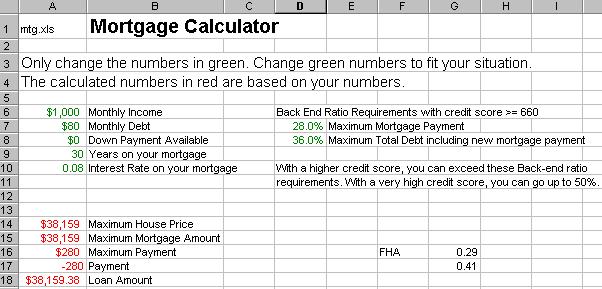
Assume the mortgage company has a back-end ratio maximum of 28% and 36%. This is a typical ratio for conforming Fannie Mae loans for applicants with credit scores of at least 660. This ratio means that the mortgage payment cannot exceed 28% of gross monthly income. Plus, the total monthly payments (new mortgage payment and new total debt) cannot exceed 36%.
This is a common ratio used today and will allow you to include the effect of monthly car payments and other consumer debt in your spreadsheet analysis.
Use the following as a guide to set up your Mortgage Calculator.
HINT: You'll need to use the =IF(condition, true, false) function to compute the maximum payment based on the condition: Is the monthly debt percentage greater than the allowable (difference between the 36% maximum total debt and the 28% maximum mortgage payment)?
Thus, maximum payment formula is: =IF((A7/A6)>(D8-D7),(D8-(A7/A6))*A6,D7*A6)
Use Excel help feature to find the appropriate function to compute the loan amount in cell A18. HINT: =PV(???)
Maximum House Price will be the Maximum Mortgage amount plus the down payment. Note: the Maximum Mortgage Amount is the same as the Loan Amount.
Save your spreadsheet as MTG.xls when you have finished.