| CIS 146 | Microcomputer Applications |

Database design: The arrangement of data into tables and fields.
A table is a collection of data about a specific topic, such as products or suppliers. Using a separate table for each topic means that you store that data only once. This results in a more efficient database and fewer data-entry errors.
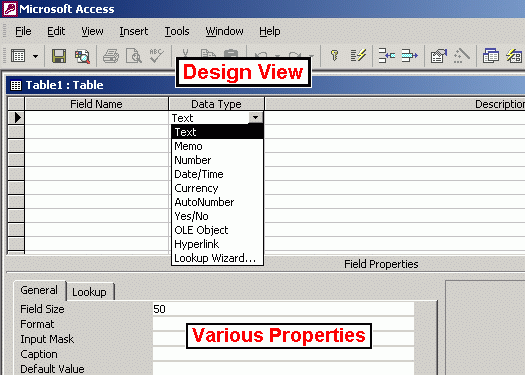
Data Types: Data type is a characteristic about a field which determines what kind of data it can hold. Pick the data type based on the type of information that will be stored in the field.
Access provides the following data types:
Considerations to determine which data type to use:
Primary Key: Unique identifier. A primary key is one or more fields whose value or values uniquely identifies each record in a table. We use the primary key to link tables together. A primary key cannot allow Null values and must always have a unique index. A primary key is used to relate a table to foreign keys in other tables.
Foreign Key: A field in one table whose values are required to match the primary key of another table. For example, an account number in an invoice table could be required to match the account number of an account from the accounts table.
Referential Integrity: A property that ensures that the value in a foreign key must match the primary key in another table. For example, by clicking the Enforce Referential Integrity check box when joining tables, you make certain that a user cannot enter an invoice for an account which does not exist in the accounts table.
Join: find records in two tables that have identical values in matching fields. A join is an association between a field in one table or query and a field of the same data type in another table or query. Joins tell the program how data is related. Records that don't match may be included or excluded, depending on the type of join.
Index: An ordered list which is usually based on one field. An index is a feature that speeds up searching and sorting in a table based on key values and can enforce uniqueness on the rows in a table. The primary key of a table is automatically indexed. Some fields can't be indexed because of their data type. We can also base an index on multiple fields. Multiple-field indexes enable you to distinguish between records in which the first field may have the same value.
Data Redundancy: Storing the same fact in more than one place. Avoid data redundancy as it can waste disk space and cause inconsistent data. This means that we would not store a customer name in two different tables. Instead, we would link to a second table by using a customer number.
Problems with data redundancy:
Detail Lines in Reports: The line that prints one line for each record in the underlying table or query.
Forms: A type of a database object that is primarily used to enter or display data in a database. You can also use a form as a switchboard that opens other forms and reports in the database, or as a custom dialog box that accepts user input and carries out an action based on the input.
Query: A question we ask in a way that a database can answer. Often, we will search a table for a specific record or group of records - For example, searching for all clients that live in Alabama.
Computed Field: a field whose value is based on another field - For example, a tax field may be computed by multiplying the tax rate times the invoice amount.
Update Query: A query which automatically changes the value of specified fields in a table at once.
Form view - one record appears on the screen at a time which allows more fields to be viewed.
Wildcards: Used in queries to allow any character.
Computed Field or Calculated Field: A field, defined in a query, that displays the result of an expression rather than displaying stored data. The value is recalculated each time a value in the expression changes. A computed field is a field whose value is based on a calculation of one or more fields. To create a computed field, type the computed field name followed by a colon, then create the formula by enclosing field names in brackets.
For example, OnHandValue:[OnHand]*[cost] will create a computed field named
OnHandValue and the values of this computed field will be the [OnHand] field
multiplied by the [Cost] field.
Zoom: Provides a larger data input area. Although not a test question, the F9 key is the Zoom key.
Grouping: Select GroupBy as entry in the total row in the field column to be used.
Searching: Running a query to find all clients in a particular area.
Validation Rules: User must follow these rules when entering data. For example, create a validation rule that would require all hire dates to be on or after July 4, 1999 if that date was the date that the company was founded. Access will not allow a user to enter a date before that date if this validation rule is in effect. Validation rules help to reduce inaccurate data input, but it will not eliminate it.
Required: Will only allow user to leave a record after entering information in a field.
Default Value: Set the default value attribute of a field to a common value to avoid having to type the same information over and over. For example, if I was entering a lot of new accounts that were located in Birmingham, Alabama, I would set the default value property of CITY to Birmingham and I'd set the default value property of STATE to Alabama. When I entered data, I could tab through the fields since the information would already be there by default. I would only have to type a field's value for STATE if it was different than the default value of Birmingham, in this example.
Comparison Operators: Used to specify conditions to limit which records are included in the result set of a query or filter.
For example, the following criterion selects records for which the value for
the Order Amount field is greater than 30,000: Order Amount > 30000
Logical Operators: You can enter additional criteria for the same field or different fields. When you type expressions in more than one Criteria cell, Microsoft Access combines them using either the AND or the OR operator. Access determines if you are wanting to use the AND or OR operator depending upon where the expression is placed.
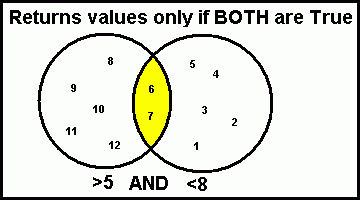
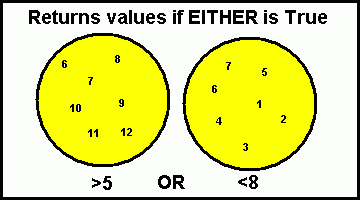
For example, Let's assume we're about to create an account list for a new salesperson that is taking over the three state territory of AL, GA, and FL. How do we create a query to return a list of all accounts with a branch in at least one of the following states: AL, GA, and FL? Would you use AND or OR?
ANSWER: You would use OR because you want all companies listed, even if they're only located in one state. If you use AND, only those companies that had branches in all three states would be listed.
Update query: Automatically changes the value of specified fields. BE CAREFUL with the UPDATE QUERY! It will update (or change) all your data!
One to many relationship: A relationship between two tables where one record in the first table can match many records in the second table. For example, a customer table can be joined with an invoice table using a One-To-Many relationship. One customer can have many invoices.
Portrait Orientation: Taller than it is wide.
Landscape: Wider than it is tall.