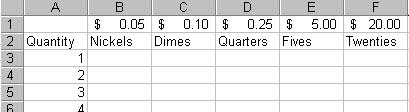
You decide to create a tally sheet to help them become more accurate with their change fund. Your sheet will allow them to simply count their coins and look at your tally sheet to arrive at the total dollar amount. If they count 17 nickels, they can look up on your tally sheet, and find that 17 nickels is 85 cents.
To avoid errors and speed up the process of creating this tally sheet, you decide to create just one formula that can be copied to the rest of your sheet. You will use your knowledge of absolute and relative addresses to create that one perfect formula.
Use the following as a guide to set up your tally sheet. Be careful to place text in the exact cells indicated so that your formulas will match the solutions and hints.
Use Edit, Fill, Series to complete the number series in column A to 50 coins total.
Create a formula in cell B3 that can be copied right and down to fill the entire table. This formula should calculate the total value of the quantity of each coin type. For example, ten dimes will equal one dollar, eight quarters will equal two dollars, etc.
HINT: The formula in B3 should multiply cell B1 by the quantity in cell A3.
Keep in mind that some references need to be absolute, while others will be relative - all in the same cell reference.
Note that the same cell reference may have a dollar sign in front of a column letter without a dollar sign in front of the row number. (Example: $A3) This would force the column reference to be locked down on the column letter - an absolute reference, while in the same reference to the same cell, the row number would be relative to the location of the formula.
You could also use A$3, which would force the row reference to be locked down on the row number - an absolute reference, while in the same reference to the same cell, the column letter would be relative to the location of the formula.
Save your finished worksheet as CHANGE.xls on your floppy disk.