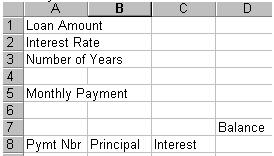
Load Microsoft Excel to create the following spreadsheet.
Place the following information in a worksheet. Be careful to place text in the exact cells indicated so that your formulas will match the solutions and hints below.
Change the width of column A to fit the longest text entry. Enter $100,000 in cell B1, .08 in cell B2, and 30 in cell B3. Format B1 to currency with zero decimals and B2 to percent with one decimal. In cell B5, create a formula that will calculate the monthly loan payment based on the numbers given in cells B1, B2, and B3. Your calculated Monthly Payment should be $733.76.
The Excel formula: =PMT(B2/12,B3*12,B1)*-1
Save this file as AMORT on your floppy disk.
To insert the numbers 1 through 360 in the range A9:A368, use Fill, Series (Excel) or Fill Series (Works) on the Edit menu. Add the appropriate formula in cell D8 (Hint: +B1). Create a formula in cell C9 that will compute one month of interest at the rate in B2 on the previous balance in cell D8. Insert the required formula in cell B9 that will subtract the current interest amount in cell C9 from the total payment found in cell B5. Finally, Enter the formula in cell D9 that will compute the new balance, previous balance in D8 minus current principal reduction in B9. Copy the range B9:D9 down to fill the entire amortization schedule to 360 payments.
Double-check your figures. Make sure they make sense. For example, the balance should be zero after the 360th payment. Each month, you should see a very small principal amount gradually increase, over the life of the mortgage, to make up most of the payment by the end of the 30 years. If things don’t look right, look closely at the first few payments. Examine the formulas (look at edit line) entered in each cell for the second payment. Consider absolute vs. relative cell referencing. By default, spreadsheets use relative cell referencing when formulas are copied. Do you really want every cell reference to be relative?
Correct errors (if any) and save the AMORT file on your floppy disk. Need help? Try this video - Amort Video
HINT: The formulas for the second and third payment are listed below.
Pmt #2: Principal: B5-C10, Interest: (B2/12)*D9, Balance: D9-B10
Pmt #3: Principal: B5-C11, Interest: (B2/12)*D10, Balance: D10-B11