The Fair Labor Standards Act requires that all workers (not managers) be paid time and a half for all hours worked over 40 hours in a week. For example, if someone earned $10 per hour and worked 45 hours, they would get paid $475 for the week ($10 x 40 regular hours = $400, plus $10 x 1.5 x 5 overtime hours = $75).
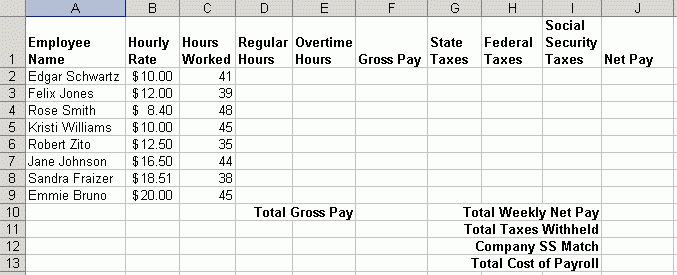
Load Microsoft Excel and create the following spreadsheet.
Place the following information in a worksheet. Be careful to place text in the exact cells indicated so that your formulas will match the solutions and hints below.
The syntax of the =IF function is
Where Condition is the condition you want to test. True_value is the formula that you want to appear in the cell if the condition is true. False_value is the formula you want to appear in the cell if the condition if false. Each of the three arguments are separated by commas and must be in the above order inside the parentheses.
In this example, we will want to test whether a worker has worked overtime hours. Overtime hours are any hours greater than 40 hours worked in a week. Our condition could either be if HOURS WORKED is greater than 40, or it could be if HOURS WORKED is less than or equal to 40. (C2>40 or C2<=40). Either formula will work. Depending upon your choice of formulas, your true and false values will be slightly different.
Create an =IF function to calculate the appropriate number of regular hours in cell D2. Create another =IF function to calculate the appropriate number of Overtime Hours in cell E2. Need Help? Try this video link - Payroll Video
Place a formula in cell F2 that will calculate the employee's gross pay. You will multiply REGULAR HOURS by the HOURLY RATE, then, add the overtime pay by multiplying 1.5 by the OVERTIME HOURS times the HOURLY RATE. For example, you would use D2*B2+1.5*E2*B2 to calculate GROSS PAY in cell F2.
Create a formula for G2, H2 and I2 that calculates taxes at 5% for State, 18% for Federal and 7.65% for Social Security. Create a formula for J2 that takes the GROSS PAY and subtracts out all three tax amounts to arrive at the employee's NET PAY.
Copy your formulas from the range D2:J2 down to the range D3:J9.
Use the =SUM function in F10 to calculate the total gross pay for all employees. Since companies are required to match Social Security taxes, you will need this number to calculate the COMPANY SS MATCH amount in cell J12. Companies are required to match the total payroll at 7.65%. Create the appropriate formula in cell J12.
Use the =SUM function in J10 to calculate the TOTAL WEEKLY NET PAY. Use the =SUM function in J11 to calculate the total of all taxes in the range G2:I9.
Finally, use the =SUM function to calculate the TOTAL COST OF PAYROLL in cell J13. You'll simply add the three numbers above J13 to get this total. HINT: Your total should be exactly $5,000.00.
Save this file as PAYROLL on your floppy disk.